Open PIX Assistant
AdvancedSignatureMultimodalRetriverGuardrails
PIX is Brazil's instant payment system. A transfer needs three things: the amount, the key type, and the key ID.
The Problem
Users do not always describe a payment cleanly:
- they type a message;
- they send an audio note;
- they attach an image with a key, QR code or PDF;
- they refer to a recipient by name ("send R$50 to Maria") without knowing the key.
The Plan
We will build a PIX assistant that handles text, audio, and image inputs in a multi-turn conversation to confirm and execute transfers. We will use the declarative API to transfer data between modules.
If the user sends audio, we transcribe it first so the rest of the pipeline works with plain text.
From there, a chat agent handles the conversation. Whenever the user's intent looks like a transfer, the agent calls a PIX extractor tool rather than trying to extract the data itself. That tool receives the full message automatically — including any image or file. If there is a QR code in the image, it is decoded before the model runs, so the payload arrives as plain text.
The extraction agent pulls out the amount, key type, and key ID from whatever is available. If any PIX field is detected, the tool checks the user's contact agenda with a fuzzy retriever using the extracted key ID as the query. The tool returns both the extracted fields and any matching contacts — the chat agent presents them and asks the user to confirm or provide the full key directly.
Once the user picks a contact and confirms the amount, the agent calls the transfer function. A moderation guard runs before every model call: if the input is flagged, the pipeline short-circuits and the model is never invoked.
Architecture
User Message
(user.text, audio_content, image_content, file_content)
                │
                ▼
         PIXAssistant
                │
                ├── has audio?  → STT → user.text
                │
                ├── has image or file? → msg.vars.has_mm_content = True
                │
                ▼
           Assistant
        (tools: [PIXExtractor, TransferPix])
                │
    │  task_context (vars)  │
    │  "user sent a file —  │
    │  call PIXExtractor"   │  ← rendered only when has_mm_content is True
                │
                │ calls PIXExtractor()
                ▼
         PIXExtractor
         @mf.tool_config(inject_message=True)
                │
                ├── image present? → pyzbar → msg.vars.qr_content
                │
                ├─── ExtractorAgent ──→ {amount, key_type, key_id}
                │    (ChainOfThought)
                │    task_context: qr_content (when present)
                │    task_multimodal: image_content
                │
                └─── intent detected?
                          │
                          ▼
                   ContactSearcher ──→ top-K fuzzy matches (agenda lookup)
                          │
                          ▼
               "## Extracted PIX data\n..."
               "## Matching contacts\n..."
                          │
                          ▼ (tool result → back to Assistant)
                     Assistant
               confirms contact with user
                          │
                          │ user confirms
                          │ calls TransferPix()
                          ▼
               "Transfer submitted. TX: ..."
The task_context template is the key design detail: instead of hardcoding multimodal handling in the static system_message, the hint is injected dynamically from msg.vars only when relevant. Without return_direct, the extraction result flows back to the Assistant as a tool response — the agent presents the contacts and asks for confirmation before calling TransferPix.
Setup
Setup your chat completion model (check dependencies)
Authenticate by setting the OPENAI_API_KEY env variable.
Authenticate by setting the GROQ_API_KEY env variable.
Install Ollama and pull your model first:
Authenticate by setting the OPENROUTER_API_KEY env variable.
Authenticate by setting the SAMBANOVA_API_KEY env variable.
Self-hosted with an OpenAI-compatible API:
Step 1 — Models
import msgflux as mf

mf.load_dotenv()
chat_model       = mf.Model.chat_completion("openai/gpt-4.1-mini")
mm_model         = mf.Model.chat_completion("openai/gpt-5.4-mini")
stt_model        = mf.Model.speech_to_text("openai/whisper-1")
moderation_model = mf.Model.moderation("openai/omni-moderation-latest")
Use a vision-capable model for mm_model when you need the extractor to read images and files directly. QR codes are decoded by decode_qr_codes before the model runs — the model receives the payload as plain text.
Step 2 — Simulated Contacts
Install the QR decoder and fuzzy retriever:
# system dependency for pyzbar (Ubuntu/Debian)
apt-get install libzbar0

pip install rapidfuzz pyzbar Pillow
Define a small fixed contact list. This becomes the fuzzy search corpus.
def build_corpus(contacts: list[dict]) -> list[str]:
    return [
        f"{c['name']} | key `{c['key_type']}`: {c['pix_key']}"
        for c in contacts
    ]


contacts = [
    {"name": "Ana Souza",        "key_type": "cpf",          "pix_key": "123.456.789-00"},
    {"name": "Bruno Oliveira",   "key_type": "phone_number",  "pix_key": "+55 11 91234-5678"},
    {"name": "Carlos Mendes",    "key_type": "email",         "pix_key": "carlos.mendes@email.com"},
    {"name": "Daniela Rocha",    "key_type": "random_key",    "pix_key": "a1b2c3d4-e5f6-7890-abcd-ef1234567890"},
    {"name": "Eduardo Ferreira", "key_type": "cpf",           "pix_key": "987.654.321-00"},
    {"name": "Fernanda Lima",    "key_type": "email",         "pix_key": "fernanda.lima@email.com"},
    {"name": "Gabriel Costa",    "key_type": "phone_number",  "pix_key": "+55 21 99876-5432"},
    {"name": "Helena Martins",   "key_type": "email",         "pix_key": "helena.martins@mail.com"},
    {"name": "Igor Pereira",     "key_type": "cpf",           "pix_key": "111.222.333-44"},
    {"name": "Julia Almeida",    "key_type": "random_key",    "pix_key": "f9e8d7c6-b5a4-3210-fedc-ba9876543210"},
]
corpus = build_corpus(contacts)

fuzzy = mf.Retriever.fuzzy("rapidfuzz")
fuzzy.add(corpus)
Each corpus entry is a single searchable string: "Ana Souza | key cpf: 123.456.789-00". RapidFuzz ranks entries by approximate string similarity — a query like "Ana" or a misspelled name still surfaces the right contact. Scores range from 0 to 100; we use a threshold of 60 to filter out poor matches.
Step 3 — STT, Extractor and Contact Searcher
STT consumes audio_content from the message and writes the transcription to msg.user — the same dotdict the chat agent reads as its task input via "task": "user". This means audio and text messages flow through identical downstream logic.
import msgflux.nn as nn

class STT(nn.Transcriber):
    """Transcribes user audio into msg.user."""
    model = stt_model
    message_fields = {"task_multimodal": {"audio": "audio_content"}}
    response_mode = "user"
Why response_mode = \"user\" and not \"user.text\"
The OpenAI Whisper provider returns a dict {"text": "..."}. Writing it to "user" sets
msg.user = {"text": "transcription"}, so msg.user.text is the plain string.
Writing to "user.text" would create a double-nested msg.user.text = {"text": "..."},
which breaks the "task": "user" extraction downstream.
ExtractorAgent reads from msg.user (which includes user.text) and optionally from image_content. The task_context template injects the decoded QR payload when present — the model receives it as plain text before processing the image. All three output fields are Optional because the user might provide only partial information.
from msgflux.generation.reasoning import ChainOfThought

class ExtractorAgent(nn.Agent):
    """Extracts PIX payment fields from text and image."""
    model = mm_model
    system_message = "You are a specialist in Brazilian PIX payments."
    instructions = """
    Extract the PIX transfer details from the user message.
    The key_type must be one of: cpf, cnpj, email, phone_number, random_key.
    recipient_name is the person's name when mentioned (e.g. "send to Ana").
    key_id is the actual PIX key value (email, CPF, phone, etc.) — not a name.
    If a field is not clearly stated, return null for that field.
    """
    generation_schema = ChainOfThought
    signature = """
    text ->
    amount: Optional[float],
    key_type: Optional[Literal['cpf', 'cnpj', 'email', 'phone_number', 'random_key']],
    key_id: Optional[str],
    recipient_name: Optional[str]
    """
    message_fields = {
        "task": "user",
        "task_context": "vars",
        "task_multimodal": {"image": "image_content"},
    }
    templates = {
        "task_context": (
            "{% if qr_content %}"
            "QR code decoded from the image:\n{{ qr_content }}\n"
            "{% endif %}"
        )
    }
    response_mode = "payments.pix"
ContactSearcher uses the extracted key_id as the query against the fuzzy corpus and returns an already-formatted string via Jinja template. The threshold (0–100) controls how similar the query must be to surface a result. When no agenda match is found, the transfer is not blocked — the agent simply asks the user for the full PIX key directly.
class ContactSearcher(nn.Searcher):
    """Checks the contact agenda for recipients matching the extracted key."""
    retriever = fuzzy
    message_fields = {"query": "user.text"}
    config = {"top_k": 10, "threshold": 60.0}
    templates = {
        "response": (
            "{% if results %}"
            "## Contacts in your agenda\n"
            "{% for item in results %}{{ loop.index }}. {{ item.data }}\n{% endfor %}"
            "{% else %}"
            "## Contacts in your agenda\n"
            "This recipient is not in your contact list. "
            "You can still proceed — ask the user for the full PIX key directly."
            "{% endif %}"
        )
    }
Step 4 — PIXExtractor Tool
PIXExtractor wraps both ExtractorAgent and ContactSearcher. When payment intent is detected (at least one PIX field is non-null), it runs ContactSearcher and returns both results as a structured string. The Assistant receives this as a regular tool response and continues the conversation.
Before the model runs, two things happen:
- Image download — if
image_contentis a URL string, it is downloaded to bytes. Vision models receive base64-encoded content, not remote URLs. - QR decoding —
pyzbardecodes the QR payload. Dynamic PIX QR codes embed a UUID in a bank URL (/pix/qr/v2/<uuid>);extract_pix_keyextracts the UUID and labels itrandom_key:so the model can setkey_typeandkey_idcorrectly. For static QR codes (CPF, email, phone embedded in EMV), the raw payload is passed and the model interprets it on its own.
import io
import re
import urllib.request
from PIL import Image
from pyzbar import pyzbar

_UUID_RE = re.compile(
    r"[0-9a-f]{8}-[0-9a-f]{4}-[0-9a-f]{4}-[0-9a-f]{4}-[0-9a-f]{12}", re.I
)


def decode_qr_codes(image_bytes: bytes) -> list[str]:
    """Decode all QR codes in an image. Returns a list of decoded payloads."""
    img = Image.open(io.BytesIO(image_bytes))
    return [obj.data.decode("utf-8") for obj in pyzbar.decode(img)]


def extract_pix_key(qr_value: str) -> str:
    """Extract the PIX key from a QR code value.

    For dynamic PIX QR codes (URL-based), extracts the embedded UUID and
    labels it as random_key so the model sets key_type and key_id correctly.
    For static QR codes (CPF, email, phone, etc.), returns the raw value
    for the model to interpret.
    """
    m = _UUID_RE.search(qr_value)
    if m:
        return f"random_key: {m.group(0)}"
    return qr_value


@mf.tool_config(inject_message=True)
class PIXExtractor(nn.Module):
    """Extract PIX payment data and look up matching contacts from the registry."""

    def __init__(self):
        super().__init__()
        self.set_name("PIXExtractor")
        self.set_annotations({"return": str})
        self.extractor_agent  = ExtractorAgent()
        self.contact_searcher = ContactSearcher()

    def _format_result(self, pix: dict, contacts_section: str) -> str:
        pix_section = "\n".join([
            "## Extracted PIX data",
            f"- amount: {pix.get('amount')}",
            f"- key_type: {pix.get('key_type')}",
            f"- key_id: {pix.get('key_id')}",
        ])
        if contacts_section:
            return f"{pix_section}\n\n{contacts_section}"
        return (
            f"{pix_section}\n\n"
            "No valid PIX key ID found. "
            "Ask the user to provide the full PIX key directly."
        )

    def _search_query(self, pix: dict) -> str | None:
        return pix.get("key_id") or pix.get("recipient_name") or None

    def _resolve_image(self, message: mf.Message) -> None:
        """Download URL → bytes so the vision model receives base64, not a remote URL."""
        img = message.image_content
        if isinstance(img, str):
            req = urllib.request.Request(img, headers={"User-Agent": "Mozilla/5.0"})
            with urllib.request.urlopen(req) as resp:
                message.image_content = resp.read()

    def forward(self, message: mf.Message) -> str:
        if message.get("image_content"):
            self._resolve_image(message)
            qr_codes = decode_qr_codes(message.image_content)
            if qr_codes:
                message.vars.qr_content = "\n".join(extract_pix_key(q) for q in qr_codes)

        self.extractor_agent(message)
        raw = message.payments.pix
        pix = raw.get("final_answer", raw)  # unwrap ChainOfThought envelope

        contacts_section = ""
        query = self._search_query(pix)
        if query:
            contacts_section = self.contact_searcher(query)

        return self._format_result(pix, contacts_section)

    async def aforward(self, message: mf.Message) -> str:
        if message.get("image_content"):
            self._resolve_image(message)
            qr_codes = decode_qr_codes(message.image_content)
            if qr_codes:
                message.vars.qr_content = "\n".join(extract_pix_key(q) for q in qr_codes)

        await self.extractor_agent.acall(message)
        raw = message.payments.pix
        pix = raw.get("final_answer", raw)

        contacts_section = ""
        query = self._search_query(pix)
        if query:
            contacts_section = await self.contact_searcher.acall(query)

        return self._format_result(pix, contacts_section)
Step 5 — Transfer Tool
A plain function that executes the transfer after user confirmation. inject_vars=True makes the
framework inject msg.vars as a kwarg — the model never sees it. We use it to read the sender's
PIX key and print a transfer log to the console.
import uuid

@mf.tool_config(name_override="TransferPix", inject_vars=True)
def transfer_pix(amount: float, key_type: str, key_id: str, **kwargs) -> str:
    """Execute a PIX transfer. Call only after the user has confirmed the recipient and amount."""
    variables = kwargs.get("vars")
    from_key  = f"{variables['user_pix_key_type']}:{variables['user_pix_key_id']}"
    to_key    = f"{key_type}:{key_id}"
    tx_id     = str(uuid.uuid4())[:8].upper()
    print(f"[TransferPix] from={from_key} | to={to_key} | amount=R${amount:.2f} | tx={tx_id}")
    return (
        f"PIX transfer of R${amount:.2f} to {key_type} '{key_id}' submitted successfully. "
        f"Transaction ID: {tx_id}"
    )
Step 6 — Root Assistant
The root assistant will be responsible for interacting with the user. Its operating context is solely to help make transfers. When the user uploads multimodal content (image or file), the agent will be notified through a context injected into its task. We use vars to bring dynamic information to the Agent.
A Guard with on="pre" runs OpenAI's moderation API before every model call. If the input is flagged, the guard short-circuits the pipeline and returns the message directly — the chat model is never called.
system_extra_message is appended to the system prompt at runtime. It supports Jinja templates rendered against msg.vars, so the agent can address the user by name without hardcoding anything in the static prompt.
from msgflux.nn.hooks import Guard

class Assistant(nn.Agent):
    """Banking assistant with PIX extraction and payment execution."""
    model = chat_model
    system_message = """
    You are a banking assistant.

    Its objective is solely to help the user make bank transfers
    using 'PIX' (Brazilian money transfer platform).

    This means that you should not accept talking about any other
    topics that the user may discuss with you.
    """
    instructions = """
    To carry out a bank transfer, 3 pieces of information are required:
    1. value (float)
    2. key type ('cpf', 'cnpj', 'email', 'phone_number', 'random_key')
    3. key_id (key value)

    To carry out a transaction you must use the 'TransferPix' tool.

    The user can send you a message informing which transfer they want
    to make. For example "Send 10.7 to Anna".

    You will need to know Anna's entire key.

    To assist you in detecting this information, use the 'PIXExtractor'
    tool. It receives the user's message and extracts the values you need,
    searching the database for the key id. This tool also accepts
    multimodal data — images and PDFs. Multimodal content is only
    available within this tool. The system will notify you when the
    user uploads content; you must call the tool to analyze it.
    """
    system_extra_message = "The user's name is: {{ user_full_name }}"
    message_fields = {
        "task":         "user.text",
        "task_context": "vars",
        "vars":         "vars",
    }
    templates = {
        "task_context": (
            "{% if has_mm_content %}"
            "The user attached an image or file — call PIXExtractor() "
            "to extract payment data from it.\n"
            "{% endif %}"
        )
    }
    tools = [PIXExtractor, transfer_pix]
    hooks = [
        Guard(
            validator=moderation_model,
            on="pre",
            message="This message cannot be processed.",
        )
    ]
    response_mode = "response"
    config = {"verbose": True}
Step 7 — PIXAssistant
PIXAssistant is the entry point. It normalises the message and passes the accumulated history into each Assistant call so the agent remembers prior turns.
class PIXAssistant(nn.Module):
    def __init__(self, user_pix_key_type: str = "email", user_pix_key_id: str = "user@bank.com"):
        super().__init__()
        self.chat_assistant     = Assistant()
        self.stt                = STT()
        self._user_pix_key_type = user_pix_key_type
        self._user_pix_key_id   = user_pix_key_id

    def _setup_vars(self, msg: mf.Message) -> None:
        msg.set("vars.user_pix_key_type", self._user_pix_key_type)
        msg.set("vars.user_pix_key_id",   self._user_pix_key_id)
        if msg.get("image_content") or msg.get("file_content"):
            msg.set("vars.has_mm_content", True)
            if not msg.get("user.text"):
                msg.set("user.text", "[image attached]")

    def forward(self, msg: mf.Message, history: list | None = None) -> mf.Message:
        self._setup_vars(msg)
        if msg.get("audio_content"):
            self.stt(msg)
        self.chat_assistant(msg, messages=history)
        return msg

    async def aforward(self, msg: mf.Message, history: list | None = None) -> mf.Message:
        self._setup_vars(msg)
        if msg.get("audio_content"):
            await self.stt.acall(msg)
        await self.chat_assistant.acall(msg, messages=history)
        return msg
_setup_vars does three things: injects the sender's PIX key into msg.vars (for TransferPix), sets has_mm_content when an image or file is present (so the task_context template fires), and provides a fallback user.text for image-only messages (the chat agent needs a non-null task).
Examples
Example
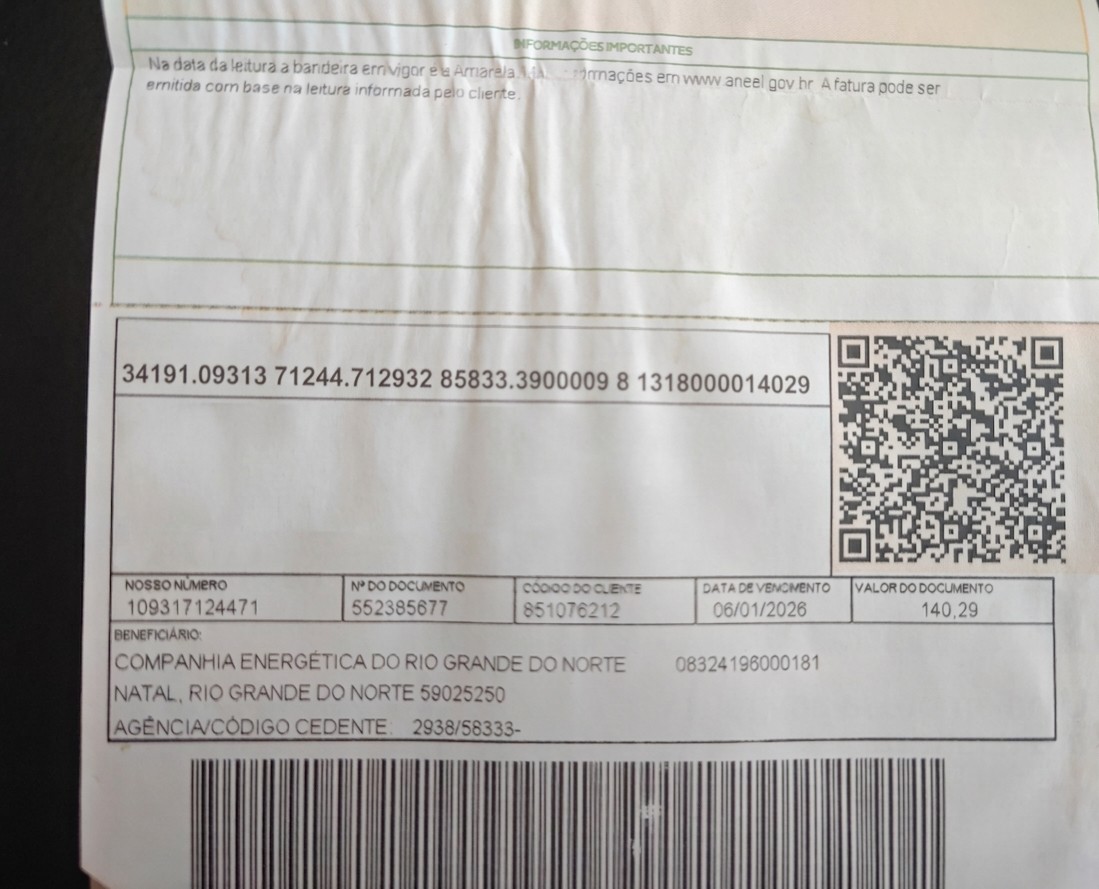
pyzbar decodes the QR code before the model runs — the full EMV/BR Code payload
arrives as plain text. The model reads amount and due date from the image and confirms
with the user before transferring.
assistant = PIXAssistant()
history = []

msg = mf.Message()
msg.set("vars.user_full_name", "Ada Lovelace")
msg.image_content = "https://files.catbox.moe/9gwd7u.jpeg"
msg.set("user.text", "Pay this bill to the PIX key in the QR code")
assistant.forward(msg, history=history)
history.append(mf.ChatBlock.assist(msg.response))
print("Assistant:", msg.response)
# → "## Extracted PIX data
#    - amount: 140.29  - key_type: random_key  - key_id: a98476c2-...
#    ## Contacts in your agenda
#    No contacts found. Shall I proceed with the key from the QR code?"

msg = mf.Message()
msg.set("user.text", "Yes, pay it")
assistant.forward(msg, history=history)
print("Assistant:", msg.response)
# → "PIX transfer of R$140.29 submitted. Transaction ID: ..."
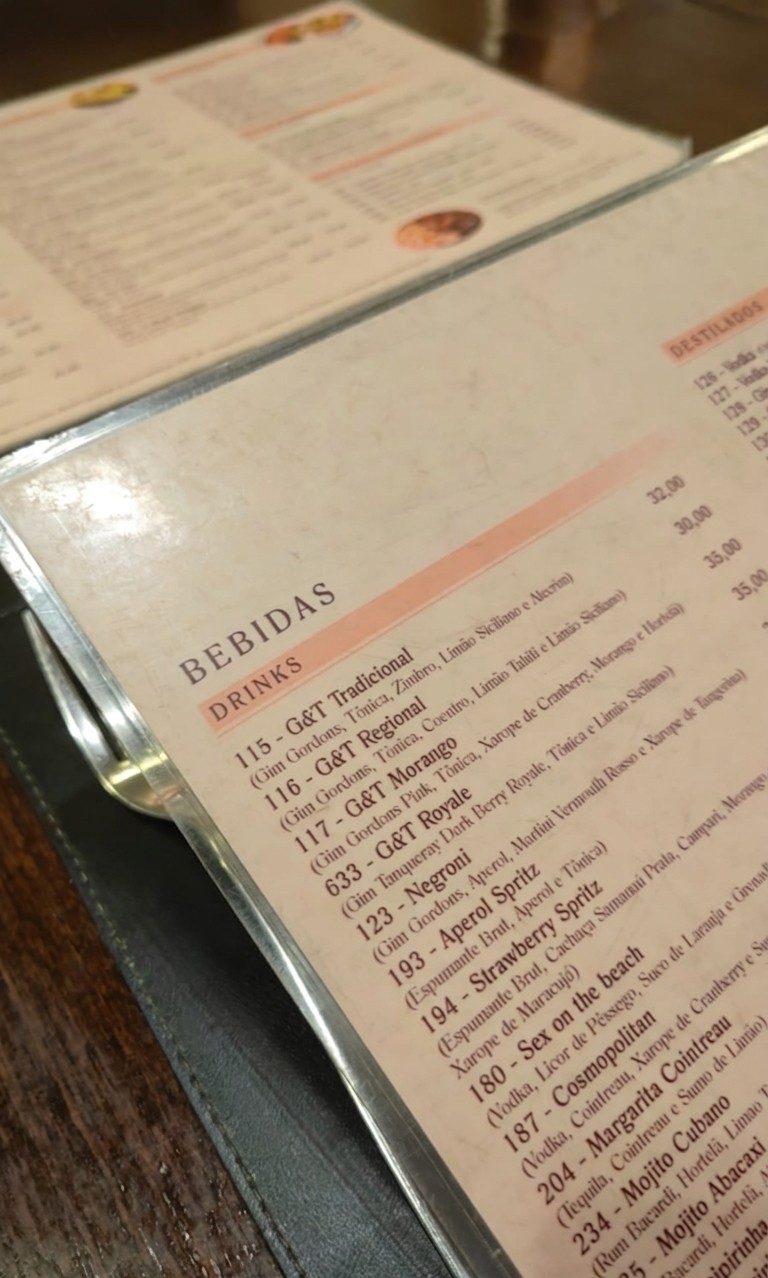
The user photographs a drinks card and says what they had. The multimodal model reads items and prices directly from the image — no menu database needed. The amount is detected from the menu; only the destination PIX key is provided in text.
assistant = PIXAssistant()
history = []

msg = mf.Message()
msg.set("vars.user_full_name", "Ada Lovelace")
msg.image_content = "https://files.catbox.moe/8bj5jl.jpeg"
msg.set("user.text", "I had the G&T Morango, send to matheus@bar.com")
assistant.forward(msg, history=history)
history.append(mf.ChatBlock.assist(msg.response))
print("Assistant:", msg.response)

msg = mf.Message()
msg.set("user.text", "Yes, confirm")
assistant.forward(msg, history=history)
print("Assistant:", msg.response)
# → "PIX transfer of R$28.00 to email 'matheus@bar.com' submitted."
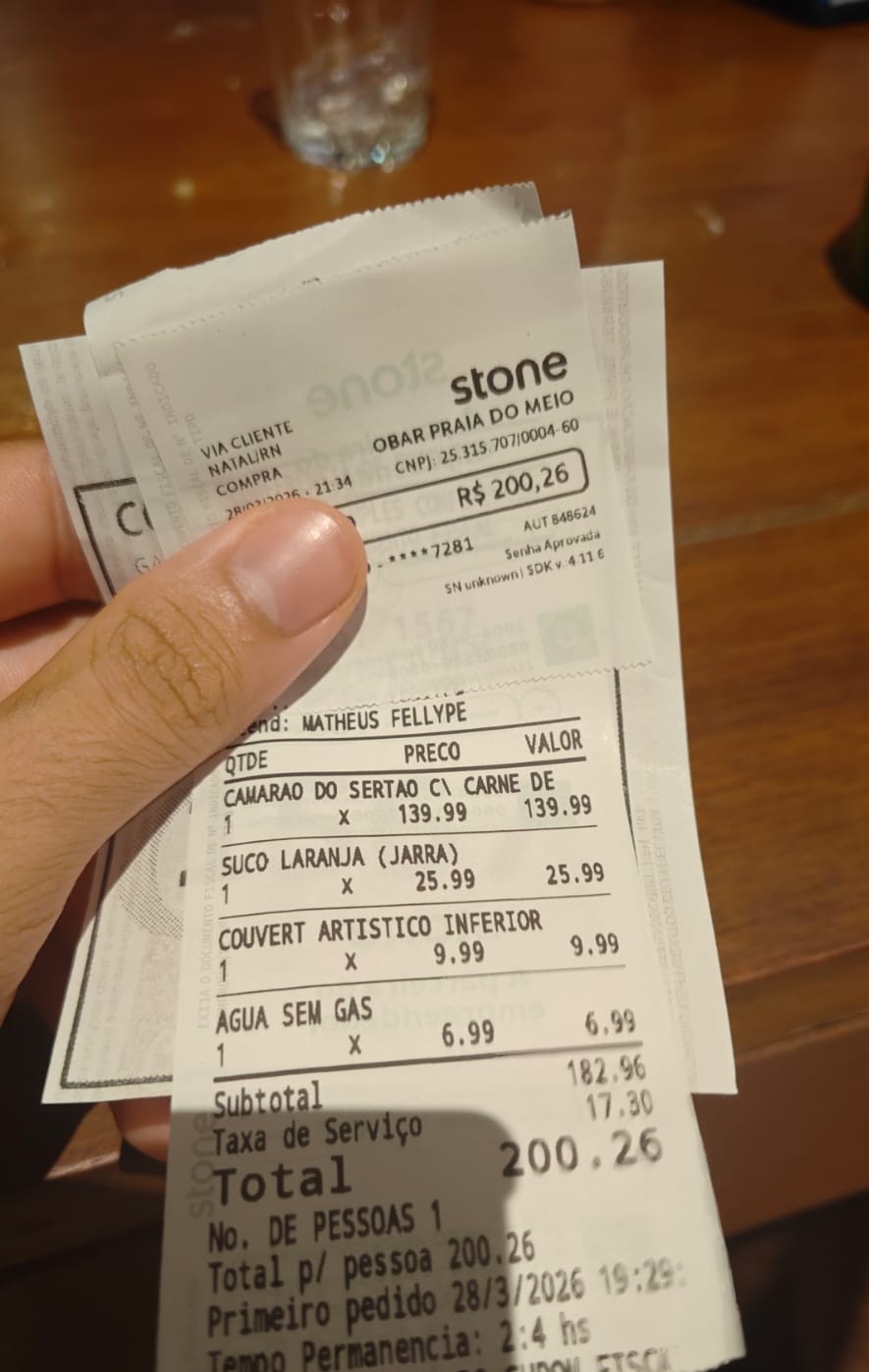
The user photographs a printed receipt and asks to split it. The model reads every line item, subtotal, and service fee, then transfers the share.
assistant = PIXAssistant()
history = []

msg = mf.Message()
msg.set("vars.user_full_name", "Ada Lovelace")
msg.image_content = "https://files.catbox.moe/otqnaa.jpeg"
msg.set("user.text", "Split between 3, transfer my share to +5584912345678")
assistant.forward(msg, history=history)
history.append(mf.ChatBlock.assist(msg.response))
print("Assistant:", msg.response)

msg = mf.Message()
msg.set("user.text", "Confirm")
assistant.forward(msg, history=history)
print("Assistant:", msg.response)
# → "PIX transfer of R$66.75 to phone '+5584912345678' submitted."
The fuzzy retriever surfaces contacts even with approximate or partial names.
A query like "Fernand" scores high against "Fernanda Lima" with WRatio.
The hardcoded contact list already includes Fernanda Lima — no extra setup needed.
assistant = PIXAssistant()
history = []

# user types a partial name — fuzzy still finds the contact
msg = mf.Message()
msg.set("vars.user_full_name", "Ada Lovelace")
msg.set("user.text", "Send R$60 to Fernand")
assistant.forward(msg, history=history)
history.append(mf.ChatBlock.assist(msg.response))
print("Assistant:", msg.response)
# → "## Contacts in your agenda
#    1. Fernanda Lima | key email: fernanda.lima@email.com
#    Which contact should I use?"

msg = mf.Message()
msg.set("vars.user_full_name", "Ada Lovelace")
msg.set("user.text", "Contact 1")
assistant.forward(msg, history=history)
print("Assistant:", msg.response)
# → "PIX transfer of R$60.00 to email 'fernanda.lima@email.com' submitted."
Generate a voice note programmatically with TTS, then pass it to the pipeline.
STT transcribes it to user.text — the rest of the pipeline is unchanged.
Speaker.forward saves the audio to a temporary file and returns the path.
Pass the path directly to msg.audio_content — encode_data_to_bytes will
read the file and use the extension (.mp3) to tell Whisper the format.
# generate the voice note
class VoiceNote(nn.Speaker):
    model           = mf.Model.text_to_speech("openai/gpt-4o-mini-tts")
    response_format = "mp3"
    config          = {"voice": "nova"}

voice      = VoiceNote()
audio_path = voice("Send fifty reais to Fernanda")  # returns a temp file path

# pass the path directly — do NOT read the bytes
assistant = PIXAssistant()

msg = mf.Message()
msg.set("vars.user_full_name", "Ada Lovelace")
msg.audio_content = audio_path   # STT transcribes on entry
assistant.forward(msg)
print("Assistant:", msg.response)
# → same flow as a text message after transcription
Extending
Exposing ContactSearcher as a direct tool
By default, contact lookup happens inside PIXExtractor — the agent never sees it. Adding ContactSearcher directly to tools gives the agent the ability to query the registry at any point in the conversation, without going through the full extraction pipeline. Useful when the user wants to browse contacts before deciding on a transfer.
ContactSearcher already exposes the schema {"query": str} so no changes to the class are needed — just add it to the tools list:
Passing conversation history to the extractor
By default, PIXExtractor receives only the current Message. In complex multi-turn flows, the extraction agent may benefit from seeing the full conversation — for example, when the user references a previous message ("use the same amount as before").
Add inject_messages=True to PIXExtractor's tool_config. The tool will then receive both message (the data transport object) and messages (the root agent's conversation history, without the system prompt):
@mf.tool_config(inject_message=True, inject_messages=True)
class PIXExtractor(nn.Module):
    ...
    def forward(self, message: mf.Message, messages: list) -> str:
        ...
From there, two options for feeding the history into ExtractorAgent:
Option A — pass as a kwarg directly:
Option B — store it in the message and map it via message_fields:
message.history = messages

# in ExtractorAgent:
message_fields = {
    "task": "user",
    "task_context": "vars",
    "task_multimodal": {"image": "image_content"},
    "messages": "history",
}
Option A is simpler. Option B is useful when the history needs to be pre-processed or shared with multiple submodules.
Controlling image detail level
When the user attaches an image, the extractor agent sends it to the vision model. By default the API chooses the detail level automatically ("auto"). For high-resolution documents — printed invoices, energy bills, or menus with small text — switching to "high" gives the model more tokens to work with and improves key extraction accuracy. For simple QR-code-only images "low" cuts cost significantly.
Set image_block_kwargs in ExtractorAgent.config:
The detail field is forwarded directly to the OpenAI images API. See the OpenAI image detail documentation for the token cost breakdown of each level.
Complete Script
Expand full script
# /// script
# dependencies = [
#   "pillow",
#   "pyzbar",
#   "rapidfuzz",
# ]
# ///

import io
import re
import urllib.request
import uuid

import msgflux as mf
import msgflux.nn as nn
from msgflux.generation.reasoning import ChainOfThought
from msgflux.nn.hooks import Guard
from PIL import Image
from pyzbar import pyzbar
from typing import Optional, Literal

mf.load_dotenv()
chat_model       = mf.Model.chat_completion("openai/gpt-4.1-mini")
mm_model         = mf.Model.chat_completion("openai/gpt-4o-mini")
stt_model        = mf.Model.speech_to_text("openai/whisper-1")
moderation_model = mf.Model.moderation("openai/omni-moderation-latest")


def decode_qr_codes(image_bytes: bytes) -> list[str]:
    """Decode all QR codes from image bytes."""
    img = Image.open(io.BytesIO(image_bytes))
    return [obj.data.decode("utf-8") for obj in pyzbar.decode(img)]


_UUID_RE = re.compile(
    r"[0-9a-f]{8}-[0-9a-f]{4}-[0-9a-f]{4}-[0-9a-f]{4}-[0-9a-f]{12}", re.I
)


def extract_pix_key(qr_value: str) -> str:
    """Extract the PIX key from a QR code value.

    For dynamic PIX QR codes (URL-based), extracts the embedded UUID and
    labels it as random_key so the model sets key_type and key_id correctly.
    For static QR codes (CPF, email, phone, etc.), returns the raw value
    for the model to interpret.
    """
    m = _UUID_RE.search(qr_value)
    if m:
        return f"random_key: {m.group(0)}"
    return qr_value


def build_corpus(contacts: list[dict]) -> list[str]:
    return [
        f"{c['name']} | key `{c['key_type']}`: {c['pix_key']}"
        for c in contacts
    ]


contacts = [
    {"name": "Ana Souza",        "key_type": "cpf",          "pix_key": "123.456.789-00"},
    {"name": "Bruno Oliveira",   "key_type": "phone_number",  "pix_key": "+55 11 91234-5678"},
    {"name": "Carlos Mendes",    "key_type": "email",         "pix_key": "carlos.mendes@email.com"},
    {"name": "Daniela Rocha",    "key_type": "random_key",    "pix_key": "a1b2c3d4-e5f6-7890-abcd-ef1234567890"},
    {"name": "Eduardo Ferreira", "key_type": "cpf",           "pix_key": "987.654.321-00"},
    {"name": "Fernanda Lima",    "key_type": "email",         "pix_key": "fernanda.lima@email.com"},
    {"name": "Gabriel Costa",    "key_type": "phone_number",  "pix_key": "+55 21 99876-5432"},
    {"name": "Helena Martins",   "key_type": "email",         "pix_key": "helena.martins@mail.com"},
    {"name": "Igor Pereira",     "key_type": "cpf",           "pix_key": "111.222.333-44"},
    {"name": "Julia Almeida",    "key_type": "random_key",    "pix_key": "f9e8d7c6-b5a4-3210-fedc-ba9876543210"},
]
corpus = build_corpus(contacts)

fuzzy = mf.Retriever.fuzzy("rapidfuzz")
fuzzy.add(corpus)


class STT(nn.Transcriber):
    """Transcribes user audio into msg.user.text."""
    model          = stt_model
    message_fields = {"task_multimodal": {"audio": "audio_content"}}
    response_mode  = "user"


class ExtractorAgent(nn.Agent):
    """Extracts PIX payment fields from text and image."""
    model          = mm_model
    system_message = "You are a specialist in Brazilian PIX payments."
    instructions   = """
    Extract the PIX transfer details from the user message.
    The key_type must be one of: cpf, cnpj, email, phone_number, random_key.
    recipient_name is the person's name when mentioned (e.g. "send to Fernanda").
    key_id is the actual PIX key value (email, CPF, phone, etc.) — not a name.
    If a field is not clearly stated, return null for that field.
    """
    generation_schema = ChainOfThought
    signature = """
    text ->
    amount: Optional[float],
    key_type: Optional[Literal['cpf', 'cnpj', 'email', 'phone_number', 'random_key']],
    key_id: Optional[str],
    recipient_name: Optional[str]
    """
    message_fields = {
        "task":           "user",
        "task_context":   "vars",
        "task_multimodal": {"image": "image_content"},
    }
    templates = {
        "task_context": (
            "{% if qr_content %}"
            "QR code decoded from the image:\n{{ qr_content }}\n"
            "{% endif %}"
        )
    }
    response_mode = "payments.pix"


class ContactSearcher(nn.Searcher):
    """Checks the contact agenda for recipients matching the extracted key."""
    retriever      = fuzzy
    message_fields = {"query": "user.text"}
    config         = {"top_k": 10, "threshold": 60.0}
    templates = {
        "response": (
            "{% if results %}"
            "## Contacts in your agenda\n"
            "{% for item in results %}{{ loop.index }}. {{ item.data }}\n{% endfor %}"
            "{% else %}"
            "## Contacts in your agenda\n"
            "This recipient is not in your contact list. "
            "You can still proceed — ask the user for the full PIX key directly."
            "{% endif %}"
        )
    }


@mf.tool_config(inject_message=True)
class PIXExtractor(nn.Module):
    """Extract PIX payment data and look up matching contacts from the registry."""

    def __init__(self):
        super().__init__()
        self.set_name("PIXExtractor")
        self.set_annotations({"return": str})
        self.extractor_agent   = ExtractorAgent()
        self.contact_searcher  = ContactSearcher()

    def _format_result(self, pix: dict, contacts_section: str) -> str:
        pix_section = "\n".join([
            "## Extracted PIX data",
            f"- amount: {pix.get('amount')}",
            f"- key_type: {pix.get('key_type')}",
            f"- key_id: {pix.get('key_id')}",
        ])
        if contacts_section:
            return f"{pix_section}\n\n{contacts_section}"
        return (
            f"{pix_section}\n\n"
            "No valid PIX key ID found. "
            "Ask the user to provide the full PIX key directly."
        )

    def _search_query(self, pix: dict) -> str | None:
        """Return the best query for contact lookup.

        Prefer the extracted key_id (exact key); fall back to recipient_name
        so that partial names like 'Fernand' still surface fuzzy matches.
        """
        return pix.get("key_id") or pix.get("recipient_name") or None

    def _resolve_image(self, message: mf.Message) -> None:
        """Download URL → bytes so the vision model receives base64, not a remote URL."""
        img = message.image_content
        if isinstance(img, str):
            req = urllib.request.Request(img, headers={"User-Agent": "Mozilla/5.0"})
            with urllib.request.urlopen(req) as resp:
                message.image_content = resp.read()

    def forward(self, message: mf.Message) -> str:
        if message.get("image_content"):
            self._resolve_image(message)
            qr_codes = decode_qr_codes(message.image_content)
            if qr_codes:
                message.vars.qr_content = "\n".join(extract_pix_key(q) for q in qr_codes)

        self.extractor_agent(message)
        raw = message.payments.pix
        pix = raw.get("final_answer", raw)

        contacts_section = ""
        query = self._search_query(pix)
        if query:
            contacts_section = self.contact_searcher(query)

        return self._format_result(pix, contacts_section)

    async def aforward(self, message: mf.Message) -> str:
        if message.get("image_content"):
            self._resolve_image(message)
            qr_codes = decode_qr_codes(message.image_content)
            if qr_codes:
                message.vars.qr_content = "\n".join(extract_pix_key(q) for q in qr_codes)

        await self.extractor_agent.acall(message)
        raw = message.payments.pix
        pix = raw.get("final_answer", raw)

        contacts_section = ""
        query = self._search_query(pix)
        if query:
            contacts_section = await self.contact_searcher.acall(query)

        return self._format_result(pix, contacts_section)


@mf.tool_config(name_override="TransferPix", inject_vars=True)
def transfer_pix(amount: float, key_type: str, key_id: str, **kwargs) -> str:
    """Execute a PIX transfer. Call only after the user has confirmed the recipient and amount."""
    variables = kwargs.get("vars")
    from_key  = f"{variables['user_pix_key_type']}:{variables['user_pix_key_id']}"
    to_key    = f"{key_type}:{key_id}"
    tx_id     = str(uuid.uuid4())[:8].upper()
    print(f"[TransferPix] from={from_key} | to={to_key} | amount=R${amount:.2f} | tx={tx_id}")
    return (
        f"PIX transfer of R${amount:.2f} to {key_type} '{key_id}' submitted successfully. "
        f"Transaction ID: {tx_id}"
    )


class Assistant(nn.Agent):
    """Banking assistant with PIX extraction and payment execution."""
    model          = chat_model
    system_message = """
    You are a helpful banking assistant.

    Answer general banking and PIX questions naturally.

    When the user wants to make a PIX transfer, call PIXExtractor().
    The tool receives the full message automatically — do not pass arguments.

    The tool returns extracted PIX fields and a numbered list of matching contacts.
    Present the list to the user and ask which contact they want to use.
    If the amount is missing, ask for it.

    After the user confirms the recipient and amount, call TransferPix() to execute.
    """
    system_extra_message = "The user's name is: {{ user_full_name }}"
    message_fields = {
        "task":         "user.text",
        "task_context": "vars",
        "vars":         "vars",
    }
    templates = {
        "task_context": (
            "{% if has_mm_content %}"
            "The user attached an image or file — call PIXExtractor() "
            "to extract payment data from it.\n"
            "{% endif %}"
        )
    }
    tools = [PIXExtractor, transfer_pix]
    hooks = [
        Guard(
            validator=moderation_model,
            on="pre",
            message="This message cannot be processed.",
        )
    ]
    response_mode = "response"
    config = {"verbose": True}


class PIXAssistant(nn.Module):
    def __init__(self, user_pix_key_type: str = "email", user_pix_key_id: str = "user@bank.com"):
        super().__init__()
        self.chat_assistant    = Assistant()
        self.stt               = STT()
        self._user_pix_key_type = user_pix_key_type
        self._user_pix_key_id   = user_pix_key_id

    def _setup_vars(self, msg: mf.Message) -> None:
        msg.set("vars.user_pix_key_type", self._user_pix_key_type)
        msg.set("vars.user_pix_key_id",   self._user_pix_key_id)
        if msg.get("image_content") or msg.get("file_content"):
            msg.set("vars.has_mm_content", True)
            if not msg.get("user.text"):
                msg.set("user.text", "[image attached]")

    def forward(self, msg: mf.Message, history: list | None = None) -> mf.Message:
        self._setup_vars(msg)
        if msg.get("audio_content"):
            self.stt(msg)
        self.chat_assistant(msg, messages=history)
        return msg

    async def aforward(self, msg: mf.Message, history: list | None = None) -> mf.Message:
        self._setup_vars(msg)
        if msg.get("audio_content"):
            await self.stt.acall(msg)
        await self.chat_assistant.acall(msg, messages=history)
        return msg


if __name__ == "__main__":
    assistant = PIXAssistant()

    # pick the first name from the generated corpus so the fuzzy search always hits
    first_contact = contacts[0]
    first_name    = first_contact["name"].split()[0]   # e.g. "Ana"

    print(f"\n--- Fuzzy contact lookup: 'Send R$60 to {first_name}' ---")
    print(f"    (full contact: {first_contact['name']} | {first_contact['key_type']}: {first_contact['pix_key']})")
    history = []

    msg = mf.Message()
    msg.set("vars.user_full_name", "Test User")
    msg.set("user.text", f"Send R$60 to {first_name}")
    assistant.forward(msg, history=history)
    history.append(mf.ChatBlock.assist(msg.response))
    print("User:", msg.user.text)
    print("Assistant:", msg.response)

    msg = mf.Message()
    msg.set("vars.user_full_name", "Test User")
    msg.set("user.text", "Contact 1")
    assistant.forward(msg, history=history)
    print("User:", msg.user.text)
    print("Assistant:", msg.response)
Further Reading
- nn.Agent — signatures, message fields, and tool use
- nn.Searcher — fuzzy, BM25, and semantic retrieval modules
- Signatures — typed input/output contracts
- Generation Schemas —
ChainOfThoughtand structured output